Friday, March 14, 2014

5 Unexpected Ways to Work Smarter, Not Harder

I wrote a post recently about ways that you can work smarter, not harder. As I worked through the list of techniques I'd collected, the post became so long that I had to split it in half. Here are even more suggestions to help you make your day more productive without putting in extra hours.

1. Limit your to-do list.

I've written about the history of the to-do list before, and how to write a great one. One of the most counterintuitive but effective methods I've found for increasing my productivity is to limit how many items I add to my to-do list.

One way to do this is by choosing one to three Most Important Tasks (MITs). These are the big, tough tasks for your day that you really need to get done. The ones that will keep you in the office past finishing time or working after dinner if you don't get through them. Leo Babauta advocates doing these before you move on to other tasks:

"Do your MITs first thing in the morning, either at home or when you first get to work. If you put them off to later, you will get busy and run out of time to do them. Get them out of the way, and the rest of the day is gravy!"

The rest of your to-do list can be filled up with minor tasks that you'd like to do, so long as you've prioritized one to three MITs. Make sure you work on these before you move on to anything minor and you'll probably find you feel a whole lot more productive at the end of the day.

Plan the night before.

Another to-do list tip that can reduce work anxiety is to write out your to-do list the night before. I often end up in bed thinking about what I need to do tomorrow and planning my day, which makes it difficult to sleep. Writing out my to-do list before I go to bed helps me to relax and sleep better. And rather than wasting time in the morning because I don't know what to work on first, I can jump straight into my first MIT the next day.

Focus just on the present day.

My most recent and favorite change to my to-do list has been separating my "today" list from a master list of everything I need to get done.

I often feel anxious about all the things I know I need to do at some point -- I need to write them down somewhere so I don't forget them, otherwise I worry about when they'll get done. But I don't want these cluttering up my list for today. That will just make today seem busier than it is.

My solution is to make a big list of everything I need done. Each night I move only a couple of things to my to-do list for the next day (I use one big list with priority markers so that anything "high" priority moves to the top and becomes my "today" list). That lets me focus on what needs doing today, but also gives me a place to dump every little task I think of that needs doing sometime.

my to-do list


2. Measure your results, not your time

The whole idea of working smarter, rather than harder, comes from the problem many of us have of putting in more and more hours, only to find we don't get more done. We want to find methods of being more productive in less time. One way to go about this is to adjust the way we measure productivity.

It sounds like a trick, but it's not a way out of getting work done. It's just that if you truly measure what you get done, rather than the time it took you, you should notice a difference in how you work, as well.

If you have big projects or tasks to get done, a good place to start is by breaking them down into completable sections. For instance, I like to break down my blog posts into sections and small tasks like adding images.


With a set of smaller tasks making up a big project, you can check off what you get done each day, even if it takes you many days to finish the whole thing. I get a nice little rush every time I check off a task within a blog post, even if it was just a 200-word section. It helps me to maintain momentum and keep going until the whole post is done.

Another way to measure what you get done each day is to keep a "done list", which is a running log of everything you complete in a day. I scoffed at done lists for a long time until I joined Buffer, where we all share what we've done each day using iDoneThis:


If you start keeping a list of everything you get done in a day, you might be surprised how much more motivated you are to do work that matters and get lots done.

3. Build "getting ready to work" routines.

As I mentioned earlier, if I don't know what to work on first, I tend to procrastinate and waste time in the mornings. You might have a different danger time for procrastination, but getting started seems to be a common hurdle. One way to make it easier to get started is by building a routine that tells your brain and body it's time to work.

Your routine could be something as simple as your daily commute or grabbing a coffee on the way to work. I usually sit at my desk with my coffee and check up on my favorite sites to see if there's any news. Once my coffee is finished, that's my cut-off point. It's my trigger to start working.

Other ways to get into a working mindset can include sitting down at your desk or workspace, turning off your phone or putting it away, exercising, stretching, or eating breakfast. You could even have an album or playlist that gets you in the mood to work and listen to that as part of your routine.

Make a weekend routine, too.

Although you might be tempted to let go of your routine entirely on your days off, our CEO Joel has found that maintaining a weekend routine that doesn't differ too much from his weekdays has worked well. The more he let go of his routine on the weekends, the longer it took him to pick it up again during the week.

4. Track what you're wasting time on.
If you're struggling with productivity, it can be tempting to start changing your routine or trying new solutions before you uncover the real problem. I've definitely done this in the past, and found it never leads to a long-term solution.

The first step in becoming more productive is working out what your regular time-sucks are. To start with, track what you do every morning to get ready for work. You might find that you're spending time on things like choosing your clothes for the day, which could be done the night before. Then track how you spend your time during the day and look for patterns -- a tool like RescueTime can help. Perhaps you'll find that you're getting caught up on Facebook too often.

RescueTime

Once you know what's taking up your time or leading you to procrastinate, you can start to make specific changes around those habits.

Something I used to waste a lot of time on in the mornings was checking out my favorite sites for news or updates. This is something I've factored into my routine now: I do this while I drink my coffee, and I know that when the coffee is gone, work has to start. This way I still get to do the thing I like, but I don't let it get out of hand or cut into time I've planned for work. Plus, I've automated the process of opening them up, cutting back on time spent remembering which sites I want to visit and typing them into my browser.

5. Build habits to help you stop working.

This one might seem a bit strange, but I think it can really work. Some of us struggle most in stopping work, rather than (or as well as) getting started. It can sometimes be too easy to just keep going for another hour, or to get your computer out after dinner and get stuck working until well after bedtime. The worst thing about these habits is that they encourage us to put off our MITs in the morning, since we know we'll end up working for long enough to get them done.

There are a few ways to help yourself switch off at home time and leave work behind. Hopefully, if you start implementing these, you'll find that you're pushed to do your most important work first thing rather than putting it off, and you'll become more productive overall.

Quit while you're ahead.
The best way is always to stop when you are going good and when you know what will happen next. If you do that every day ... you will never be stuck. -- Ernest Hemingway

This is common advice for writers, in particular, but it can apply to all kinds of work. Many famous writers have said that stopping mid-sentence or mid-paragraph makes it much easier to pick up the pen again the next day.
You don't go on writing and writing until you come to the end of it, because when you do, then you say, well, where am I going to go next? You make yourself stop and you walk away. And you can't wait to get back because you know what you want to say next. -- Roald Dahl

Set a firm cut-off time


Sean Ogle wrote a great post about this idea. He has a strict cut-off time of noon most days, which is pretty extreme. You could make this work with an evening cut-off time, though, to get you out of work by, say, 5 p.m.

Sean gets up early, so he has 5-6 hours of work time before his midday cut-off point. But since he's strict about stopping work at noon, he still needs to be ruthless with prioritizing his tasks:
I know that by the time mid-day hits, my energy is going to start to wane. At that time, it'll be much more difficult to do anything I don't want to do, so I always try and do the hardest or most valuable items first.


Another way to try limiting your time is to work on your laptop without the power cord. This limits you to however long your battery lasts, and I've found it's a good motivator to get important things done more quickly.

Plan something for after work.

Another tip from Sean's blog post is to plan an activity or event for after work. In Sean's case, he plans to catch up with friends or attend events around 12:30 or 1 p.m., which helps to reinforce his noon cut-off time.

If you're aiming to get out of the office around 5 p.m., you might set up a dinner date, a quick after-work drink with a friend or a family visit. External forces can sometimes be the motivation you need to get things done within the time you have, rather than letting them drag out.

I also like the feeling of having something fun to look forward to when I'm finished with work. Sometimes it's even better when this is a flexible appointment, like some shopping or visiting a friend, so that I'm motivated to get my work done even faster to get to that reward.

Create a wind-down routine.

Having a routine to help you wind down from work can be helpful if you tend to struggle to switch off. I've always found light exercise works well, so walking home from the office or taking a walk after work is a habit I like doing. Our CEO Joel goes for an evening walk as part of his going-to-bed routine, since it's such a good winding-down activity.

Journalling can be really relaxing, as can talking through your day with a partner or friend. Something Benjamin Franklin used to do was ask himself every night, "What good have I done today?" Writing about your day can be a good way to reflect and keep a log of what you've done, as well as transitioning out of your work mode.

If you're getting into the habit of planning your day the night before, this can be a good way to cap off your workday. Pick out your MITs for tomorrow and plan a task list so you can relax once you leave work.

If these things aren't enough to help you get up and go home, you may want to try an alarm to stop work. Alarms to go to bed on time can be as effective as morning alarms to wake us up, so why not try one to remind you to stop working?

What else works for you to increase your productivity without putting in more hours? Let us know in the comments.

If you liked this post, you might also like The Daily Routines of 7 Famous Entrepreneurs and How to Design Your Own Master Routine and 5 Unusual Ways to Start Working Smarter, Not Harder, Backed by Science.

Image credits: Rob Warde

Thursday, March 13, 2014

The Writers Workbench: TV Goes Remote

A while back, we looked at a couple of the ways that looking at television has changed, moving it from the home box in the living room, to something you watch on your computer screen - whether still at home or on the road with your notebook or even tablet. The world of watching TV has indeed changed drastically, and this month we look at only a few other small ways that has occurred - from the upcoming Mobile TV to using your iPod as a remote.

An added note. I had originally intended to publish this many months ago - last year, in fact, but I decided to wait until there was more availability about Mobile TV, which as I note above, is "upcoming." However, the new technology has been rolling out slower than I'd hoped and - while it still exists and is likely to become even more available - at a certain point you just can't keep holding on to things and have to move forward. When Mobile TV becomes even more mature, I'll try to look into it further, but for now, it remains an interesting technology that's...well, upcoming. A couple of the products, in fact, have been discontinued - yet they're interesting nonetheless and still available. And since they're likely on deep-sale, the prices might make them quite worthwhile, if the products sound useful to you. I'll note which are the ones in question.

• Hauppauge Aero-M
• Logitech Harmony Touch
• Gear4 Unity Universal Remote
• Griffin Beacon Universal Remote

HAUPPAUGE AERO-M

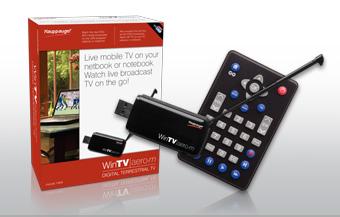
It was with much anticipation that I looked into Hauppauge's Aero-M mobile television, intended for notebook/netbooks. The company has long made some of my favorite products - in fact, I am watching one of their internal WinTVs on my computer as I type this, its video in a small window stashed away in the corner of my monitor. Unfortunately, the Aero-M has been a hit-and-miss proposition, though that's not uncommon with mobile television.

2014-02-24-WinTVAeroM.jpg

The Aero-M uses an antenna for reception and is designed to display both regular, digital ATSC broadcasts (normal, over-the-air TV - though not cable channels, which require...well, a cable connection) and ATSC-MH, which is "digital mobile " For the time being, there will always be limitations with the latter, since its dependent on how many digital mobile TV stations exist in your area. (When they do exist, you'll be able to watch a channel even when you're moving, something not generally true with regular, digital ATSC channels which compete with interference when you move. Digital mobile, however, uses error correction to adjust the reception.)

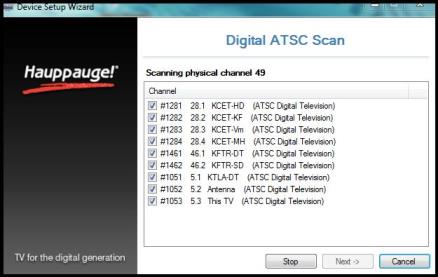
Setting up the Aero-M is simple. It will of course work on any computer with a USB port, but it's really made for use with a notebook/netbook, hence the "M" in its name, for mobile. Plug the device into a USB port and install the included software, which are the drivers and WinTV interface (the program that basically is like a little TV box and shows the programs). Let the software scan for available channels, and you're done.

2014-02-24-WinTVATSCscan.jpg


Pull out the antenna, launch WinTV and watch television.

That's good in theory, but that's where the hit-and-miss comes in. To begin with, any similar device will be limited by the reception in your area. If you can connect the Aero-M to a rooftop antenna, you'll get significantly better reception - but I chose to test it on the premise that this is a mobile device and something you'll get for on-the-go, not tether to the roof.

The built-in antenna of the Aero-M isn't especially strong, and effectiveness is dependent on a number of conditions that will change from location to location. When did a scan of both ATSC and ATSC M/H, very few channels were found. I did a second scan, and it found a couple more, but not many. Of the major stations, I was able to get CBS and NBC, though not ABC.

Tuning to a scanned channel, quality was equally dependent on conditions and could change on different attempts. Generally, it would be extremely "jerky" and sometimes even show only half a screen for a few seconds before "re-buffering." Occasionally though, channels worked fine, and when they did, the image was impressively crystal and sharp, with good audio. To be very clear, this is absolutely a "your mileage will vary" situation.

2014-02-24-WinTVview.jpg

The Aero-M comes with a remote, though at the moment this is just advance planning on Hauppauge's part. Eventually, the company will have a software update which will add support.

(The product also comes with a small extension cord, because if your USB ports are close together, the Aero-M may cover up the port next to it.)

The software than installs in Hauppauge's excellent WinTV. It's a clean, easy interface for viewing television, and provides easy buttons for DVR-like features, among them pausing, recording and fast-forwarding.

I like Hauppauge's products a great deal - and when the Aero-M works, it's a pleasure. But too much was problematic for this to be your main digital TV device. If you need something that will allow you to get mobile TV, however, it could be a good backup to have.


HARMONY TOUCH


Logitech has long had an impressive line of universal remotes, from basic models to those you think might be able to control the Lunar Space Module. Their new Harmony Touch is a replacement of their popular Harmony One, which uses a color touch screen. It's high end, though not at the top of their line. Still, it retails for $249 (at the time of writing), so it might be more than some people need, if you just want to operate a couple, basic devices. The two biggest differences from its predecessor are that it's smaller to fit better in your hand, and (most notably) it relies heavily on touch-screen icons. Much more on this later. But first, you have to get the thing set up.

2014-02-24-HarmonyTouch.jpg


With universal remotes, there are two important aspects you'll deal with - not just how to use it, but also programming the unit. (Not just for the initial set-up, but also adjusting things later.)

There are two ways to configure different remotes - either directly on the remote itself or via software, connecting the remote to your computer. Both have advantages: the former doesn't require any fiddling with computers or websites. However, the latter gives more flexibility for updating for the latest devices and their codes.

The Harmony Touch is the latter. You run the My Harmony software, which connects you to your personal settings webpage. If your needs are basic, setting up the Harmony One is incredibly easy, giving you simple and clear prompts all along the way. Little in life is perfect, and you will likely have to do some adjusting. It's still handled well with helpful prompts, but with any universal remote, especially the more devices in your home theater, there will be tweaking, and not everything can be perfectly clear.

(The Harmony Touch, of course, controls more than just home theater devices. Most anything electronic that uses an IR remote will have the potential of falling under its purview. I tested it on a radio-cassette-DVD unit, and it worked well.)

First, though, some very good news if you already use a Harmony One and are upgrading: the Harmony Touch has a wizard that will transfer your existing settings over. It worked perfectly. Easy as could be. No reprogramming at all.

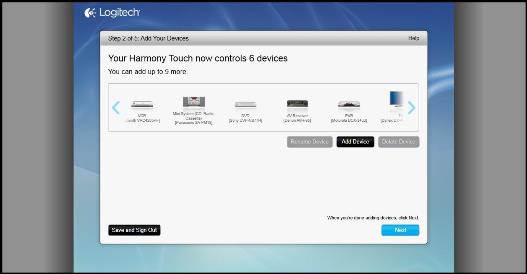
For people new to the Harmony One/Touch line, though, you'll have to program for the first time. Programming starts with basic, clear questions on the Harmony Touch software screen, asking for brand name and model number of your devices.

2014-02-24-HarmonyAddDevices.jpg

This is also where you set up "Activities." These automate those annoying steps you'd otherwise have to go through to get your TV, PVR, DVD player and whatever else all working together. Changing their settings manually can be a real burden, like when you switch from watching the TV or a DVD, but with the Harmony Touch, all you do is choose "Activities," and it basically does it all for you. (Basically is the operative word, though it's pretty successful.) For instance, one Activity is called very simply, "Watch TV." The Harmony Touch knows what has to be turned on and what settings to use. From then on, whenever you want to watch your TV, you simply hit the icon "Watch TV" on the touch screen. And it does the same for watching DVDs - the software knows what devices are needed and what their settings should be. (There are any number of Activities that can be set up. Using the remote to play with your Xbox, for instance.) It's pretty easy to do, though if you're the kind of person who wants a convoluted home theater set-up, then it will be more...well, convoluted.

In a perfect world, this works perfectly and everything syncs as it should. But the software even warns you that the settings might not all work properly, so you should test it first on your home theater set-up. If there's an issue, you just re-connect to the computer software and use the Troubleshooting feature. It has very easy prompts, asking basic questions. Again, the more intricate your home set-up, the greater the challenge for the Harmony Touch to know what settings to use. The information should be there on the screen, but from past experience (with the Harmony One) the software might not know it was actually right, and you may have to enter the information manually.

What's nice is that later on you might want to change your settings. Perhaps, for instance, you've added a new device. Or want to change commands or Favorite Channels. With the Harmony Touch, you don't have to start from scratch. Just re-connect and launch the My Harmony software again. It's extremely easy to do and very configurable. And then, it re-syncs.

(Actually, the Harmony Touch makes it even easier. You can now make some basic programming changes directly on the device itself, without having to reconnect, such as adding commands or changing some limited channel information. It's a wonderful new feature. More on this later.)

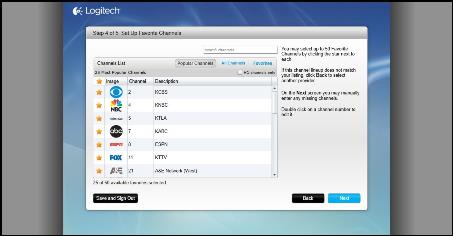
Programming is where you can configure your aforementioned Favorite Channels. (These are one-touch buttons for jumping to channels directly.) It's an easy process, and significantly more intuitive than previously. In fact, it now even includes icons for all the channels. Before, you had to go to a separate, semi-official website and manually select the icons to download. You can select and display up to 50 Favorite channels.

2014-02-24-HarmonyFavorites2.jpg


There was one, minor quibble I had in the programming process. At one point, I had to leave the computer, for three minutes. The My Harmony software timed out, and I got logged out, requiring me to log back in.

Okay, now you've finally got everything set up and configured. How does the Harmony One work in actual use?

Because it's so similar to the Harmony One, it's worth noting some of the comparisons. From online user comments I checked beforehand, I noticed some disappointment that several favorite features were missing or changed, and at first I understood the complaints and agreed - but the more I used the Harmony Touch, the more I realized how it actually worked and how configurable it was, to the extent that it was possible to return most of these old features that people said were missing. Some things are different, but mainly I suspect many of the complainers didn't read the manual or hadn't played around with the device fully yet.

One other thing highly worth mentioning - when I originally wrote this review, my reaction was quite different from what it is now. That's because I had written the review early and banked it for later use, and in the interim Logitech came out with a firmware update that radically improved things. The remote was quite good initially, but with some issues. The update addressed almost all of them. The annoying thing is that it meant I had to go back and rewrite the review. The not-annoying thing is that the Harmony Touch is now terrific. (Note: some of the graphics here might be from the old interface, but I've tried to update everything and find proper graphics as best and close as possible.)

The thing to know is that the core difference from the Harmony One is that the device has been designed to be more familiar for people now-used to working with tablets and apps. Meaning more icons, rather than hardware buttons, and more swiping. As a result, many of those previous hardware buttons are now missing. Hence, the complaints. But - the features are not gone. You just have to know to add them to the touch screen. In some cases, I didn't think the old features worked as well in the new way, but for the most part they did, and there are also many new features on top of them.

For instance, most noticeable is that there are no channel buttons. This I what most allows the remote to be much smaller. Instead, channels are on the touch screen. Clearly, this was a major design decision. Not having physical channel buttons is definitely less convenient, and this might bother some people. But over time and usage, I've come to think the trade-off is beneficial, allowing for the smaller device and better feel. Most notably this is one of the best changes in the firmware update. Previously, there were numerous icons laced through the layout that brought up the channel screen, and it was somewhat of a bother changing between modes. Now, you just swipe the screen, and it fluidly appears.

Also, there are not physical "advance" and "replay" buttons, which let you jump back and forward when using a PVR. This initially was a major issue for me - but then I discovered you could add those features to the touch screen. It doesn't work as conveniently as physical buttons, where by touch you can feel their placement, but the way they work is exactly the same and fine. Further, there is now another way, as well, and maybe even a better way to do this with the "Gesture Control" feature -- which has been drastically improved. More on that in a bit.

(By the way, this is one of those examples of how you can configure options directly on the remote without the bother of having to re-connect to your computer. Also, what I love - and which wasn't possible with the Harmony One - is that you can move the order of the icon buttons with drag- and-drop. In fact, it's now possible to change the order of many other commands under "Setting." In addition, you can even change some basic channel information of your Favorites. Not everything - you can't add a channel using just the remote, but you can change the name. Now that one thing you can't change is the order of devices. For instance, if you want to list the PVR at the top. That's hard-coded in, whether on the remote or My Harmony.)

There are also no separate Page Up/ Page Down physical buttons - they're on the touch screen. But this is even less of an issue, since you can control that function with the physical scroll wheel.

Overall, it's this configurability that stands out with the Harmony Touch. As noted, using the remote alone you can add many commands, but more importantly, with drag-and-drop you can also add most commands from one device and carry them over to another. For instance, you can copy PVR commands to the TV. That means you don't have to keep switching back and forth to use a PVR function if you're watching the TV.

To be clear, there are still physical buttons. Mute, Volume, Last Channel, accessing the Channel Guide, and separate DVD controls. Also, there's a row of buttons for channel information and quick access to programs recorded by your DVR.

(Another quibble. The DVR button only jumps directly to what has already been recorded, not to any of the other DVR features, like upcoming shows waiting to be recorded. For those features, you have to go through the Menu button.)

As mentioned above, you can set up Activities that automate multiple functions. However, when you chose to run an Activity (for instance, "Watch TV"), it doesn't always perform probably. The good news is that the Help button works extremely well, pretty much as a Wizard-like function, asking you questions. "Is the TV on now?" "Is the power on now?" And it resolves the issue automatically.

The Help button is another major firmware improve. Previously, it was an icon that sat at the bottom of the screen, an unfortunate placement because it was too easy to accidentally touch - while scrolling through channels, for instance - and it would then interrupt what you were watching and try to fix a non-existent problem. Now, it's hidden away under a Menu icon, but just one click away. (In my initial review, I wrote, "I hope they find a better place for it in the next incarnation." They did.)

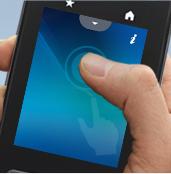
A new feature is the aforementioned Gesture Control. Using the touch pad, you can swipe to the left, which runs the DVR in reverse, for example. It worked well initially, but I didn't find it at all necessary. It was just as easy to use the scroll wheel. But that has now completely changed with the firmware update. And for two reasons.

2014-02-24-Harmonygestures.jpg

The first is that Gesture Control is now thoroughly configurable. On the remote, you just click the options and set it to work however you want. I have "Swipe left" to replay the last 15 seconds. "Swipe left and hold" will Fast-reverse. "Double tap" Pauses the DVR. And "Swipe up" is the Play command. But it can be whatever you want. It worked easily and impeccably.

And the second reason is that now you don't have to go through a series of menu options to access Gesture Control. You can get to it from any screen but just swiping up. It is now wildly convenient. For instance, I found I could leave the number keypad is the default view, and from there I can just swipe up to Gesture Control when I want those commands.

The Harmony Touch uses a rechargeable battery. Depending on how you've set up its power-eating features (like how long the screen will stay on if it's not touch), it should run for several days. But just place the wand in a holder, and the battery will charge up.

Other than the placement of the Help button (now no longer an issue), I had one other notable quibble. The placement of DVR/VCR control buttons - forward/reverse/pause - is poor, up at the top of the device. (And next to the Off button, which more than once I accidentally clicked.) Happily, you can more comfortably use the control wheel for some of those features. But for the others, you not only have to awkwardly shift its position, but worse, when you're using the controls, your palm can rub over touch screen which can cause you some features to get accidentally accessed. However...thanks to the improved Gesture Control feature, you can now create gesture commands for all those features - far away from the Off button and conveniently in the middle, on the screen.

2014-02-24-HarmonyDVR.jpg


I've mentioned a bunch of issues here, but know that most of them are easily addressed by how configurable the device is. And in most cases are now largely gone, not issues at all. And overall, it's smaller and has a very nice feel in your hand, it's exceedingly configurable, and you're much less locked into factory defaults. I miss some physical buttons, but I don't miss any functions and appreciate many new features.

For instance, in addition to those already mentioned the firmware update has also added a Sleep Timer, and you can re-configure buttons you rarely use and make them do an activity that's more common for you.

In short (after such a long review...), this is one of the best firmware updates I've ever come across for any product, period. They took a very good, though problematic product and made it something that's now a joy.

(I'm not exaggerating. Here's how much thought was put into the update. Being a touch screen device, that screen can get all mucked up and sticky from your fingers. But then, being a touch screen, it was a challenge to clean the screen because touching it could access a command. However, now there's an added option under Settings that will "lock" the remote and let you clean the screen!)

If you have simple needs, something so elaborate isn't necessary. If you currently have a Harmony One, and it's working fine, there's no need to upgrade. And if you are looking for a new remote, and the Harmony One is now available at a low price, it might be the way to go. But all other things being equal, the Harmony Touch is an extremely good improvement.


GEAR4 UNITY REMOTE

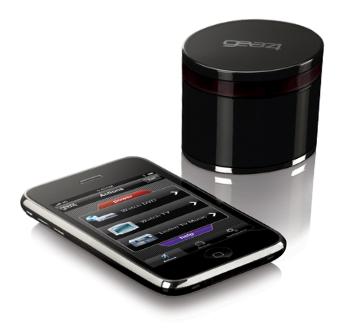
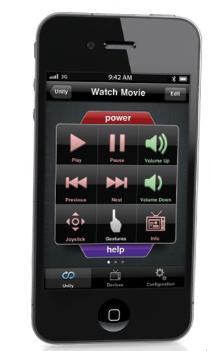
An iPhone/iPod touch can do a lot. Now, there's one more thing they can do - turn themselves into a universal remote control for your television and home entertainment devices. There are several products that convert the iPhone/iPod into a remote. Gear4 handles things with a downloadable app and an IR (infrared) blaster. Pair the blaster with your iPhone/iPod using Bluetooth, download the app, and you're basically set to dive in.

2014-02-24-Gear4ipodIR.jpg

(A caveat: the Gear4 is one of those discontinued products mentioned above. But it still can be purchased online, and at its highly-cut price, 72% off, some might find the product worth looking into.)

You have to position the IR blaster where it can find your iPhone/iPod, but there's a pretty wide range. The process to set up all your devices (TV, DVD, receiver, DVR and such) is a little convoluted - but the process is generally a little convoluted for all universal remotes. Instructions are not well explained in the manual, but the Setup Wizard does a very good job, so even if you don't understand things, it walks you through it.

The Gear4 does a good job finding devices, even a couple of older, more obscure ones I have. When going through the device options, the software on your iPhone/iPod asks questions about input and channels that most people might not know. After finishing, things didn't properly work - but (and this is an important "but" - the help wizard does an excellent job, asking if things are working, and then tries options until they do finally work.

2014-02-24-Gear4config.jpg

The important thing about universal remotes is the ability to set up unified "actions" - Watch TV or Watch a DVD movie, for instance - making all your devices work together properly. The Gear4 does that, as well, though when choosing an action (like, Watch TV), not everything turned on properly - though that's not uncommon with universal remotes. What the Gear4 does well is that it asks if things are working. If you tell it "no," it will ask what isn't on, and then fix things. It's excellent and easy, though you have to hit a bunch of intuitive keys and answer several questions.

The software is fairly responsive. There is a good, clear keypad. However, an annoying Bluetooth response-graphic pops up after most commands, though it's extremely brief.


It also allows you to create gesture control. For example, tap the screen twice to pause. Or swipe the screen horizontally to change the channel. It's a nice gimmick, though I think not overly useful. It's just as easy to tap the Pause button. And you can only change one channel at a time - useless if you want to jump from channel 55 to 424. Swiping for Volume control though is nice.

The keypad commands all work well. The biggest issue is that there aren't most options that a full remote would have. It's very basic. There are 17 commands, and these are the ones you use most (Volume, channel, input, for television), but there's no button to call up the on-screen schedule. For watching a movie, you can adjust volume, back, forward, pause, and play. But you are unable to eject a DVD. These are major omissions.

2014-02-24-Gear4use.jpg


Since the device requires Bluetooth, this uses up battery power of your iPhone/iPod, though that's not necessarily problematic. You can of course just recharge. It does take quite a few buttons to turn Bluetooth on and off which might wear thin after a while, if you find yourself using the remote periodically through the day.

If you don't own have a universal remote, and love to use your iPhone/iPod touch as much as humanly possible (as many people do...), this is a respectable option. Among other things, there's no need for another remote device that you have to keep looking for. The Gear4 also has an excellent help/wizard system, which makes setting up and using quite easy. It works well, but there's a big caveat - there are limited commands, and some important commands aren't available. And there are better options - see below, for example. In the end, while good, it's not nearly as good as dedicated universal remote. However, at the time of writing the Gear4 Unity can now be found online for as low as $28, down from the original price of $100.


GRIFFIN BEACON

In the app world where smartphones and tablets can be used as a universal remote control for your television and home theater, Griffin's Beacon makes its own auspicious entry.

("Inauspicious" might be a better word, since the product is another of those that has been discontinued. However it's still available online, and reading the review might convince you it's worth considering if the price is right. I've found it for about 75% off.)

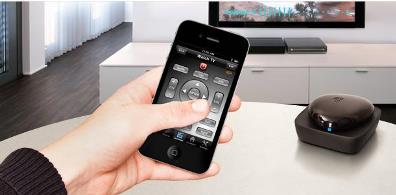
The Beacon works similarly to the above-reviewed Gear4 Unity, with a hub that transmits an IR signal (infra-red) to your device, controlled by an app that you download. In Beacon's case, that app is Dijit, and it makes all the difference in the world.

Upfront, I'll note as before that I much prefer dedicated universal remotes, compared to converting a Smartphone/tablet. There are various downsides to the latter, which will be discussed later. However, having said that, if you're someone who loves using your iPad or Smartphone for pretty much everything (and there are many such folks...), the "Beacon powered by Dijit" is by far the best I've come across. And that's due in large part because Griffin had the good sense to team up with Dijit, which is leaps and bounds ahead of most similar apps.

2014-02-24-Beaconinuse.jpg

The Beacon itself is a small hub about the size of a fat wallet. It comes with four batteries. Hold a button down until its LED begins to flash, and then place the Beacon anywhere in the room where it can face your TV. Pair the Beacon on your device, and you're done with that part of the set up.

That's when the Dijit app comes into play, which you download to your Smartphone or tablet. Right off, one huge difference from other such units I've tested is that configuring the Beacon/Dijit with your home theater devices is as easy as could be. (Other apps can be convoluted setting up the commands to run your devices.) The Dijit screen presents a comprehensive list of devices, which included my off-brand television (something other products I've tested have difficulty with). When it came to selecting a "remote" for the DVR and DVD player, you're asked simply if you want to use the automatic wizard or choose manually - I tried both ways, and they were each as easy as could be. Most importantly, what worked so well with this is that after making your selections, the Dijit was now all-configured - there was virtually no other set-up or configuration required. ("Virtually" means that a few commands did have to be "learned," but that turned out to be easy. More on that later.) Just know that, at this point, I could start using the Beacon/Dijit with nothing more to do. That's no small achievement.

More than just providing the core ability to operate your TV or DVD player, Dijit brings a huge range of options. Its functionality is particularly increased if you're connected to the Internet - this allows you to download the program schedule for your cable. You can still operate the Dijit software without it, but it will be basic functionality - on/off, volume, change channel and such.

2014-02-24-Digitschedule.jpg

With Internet connectivity, however, the power of the Beacon/Dijit shows. You get a full schedule of all channels; can change the date-and-time to see future schedule; search for shows by title, use the "filter" option to view, for example, only new Fall shows, or season premieres, or movies, sports, comedies, and much more. An "information box" has a variety of icons to choose from: it will list upcoming episodes for the current program, provide cast and crew details if they're available, connect to Twitter and Facebook for social networking, and even provide YouTube videos. (I'm not quite sure how they're selected, but they generally seem to be related in a tangential way to the program you're watching). When using the full program schedule, you can jump directly to the show you want by clicking on the channel, but if you click on the program name itself, it will bring up information and options about that particular program. All in all, it's a vast spectrum of material to choose from.

2014-02-24-DijitTVinfo.jpg


To operate your devices (TV, DVR, DVD...), which ultimately is the core feature, the Dijit app works very smoothly. You switch between devices by simply clicking on the Device icon. For the most part, the software automatically knows how the remote commands work, so there's nothing to learn, as noted. One very slight annoyance is that volume control only works when you're accessing the TV device. That's fine if you normally change channels from your TV because you don't have a DVR. But if do use a DVR and change your channels from that screen, there's no volume control. Happily, though, Dijit provides a workaround solution - it works with a variety of hand gestures. And among those are that swiping two fingers down on the screen will lower the volume, two fingers swiped up will increase it, and three fingers swiped downward mutes or unmutes.

Within the DVR screen, there are many other commands, including a pop-up icon for pausing, fast forward/rewinding, and recording.

As mentioned, there will be a few commands that the Dijit won't know. In my case, those included the Back/Last Channel button and the cursor navigator. But the Beacon will let the app learn these, and pretty easily. Basically, you tell the Dijit app what you want to learn, hold your device's original remote up to the Beacon's IR port, and simply operate the command on the original remote as you normally would until the Dijit shows it now knows what to do.

The Dijit app lets you create "Activities" to automatically run, rather than needing to manually change settings when switching between devices. This is one of the trickier matters for universal remotes, since home theaters have different configurations that require being set for each device that allows them to work together. One Activity was already set up, "Watch TV." To create others (like, Watch a Movie), just tap the Activity icon and follow the wizard prompts that guide you through a check list of what you want done. I had no trouble following the set-up options, though things didn't work properly when I went to switch between "Watch TV" and "Watch a Movie" mode. However, although it didn't work automatically, as they should, I found that merely tapping the "Input" icon to make changes did the trick. What is nice with the Dijit software is that if you don't like how something is working, the screen is highly customizable, letting you add, remove or edit buttons.

2014-02-24-Dijitcustomize.jpg


All the options you have on your original remotes weren't available on the Dijit (particularly for the DVD), though plenty were. There are also countless other settings you can access, most of which you'll likely never touch. One though was very helpful: under the Settings option, it showed the remaining battery level of the Beacon. By the way, to save on battery use, the Beacon will automatically go into a sleep mode 60 minutes after the unit is disconnected. (It will disconnect if you go more than 30 feet away, or if you turn your Bluetooth off.)

For all that the Beacon/Dijit does well, there are a couple things that I find problematic, which ultimately why I prefer a dedicated universal remote, rather than a configured Smartphone tablet. In fairness these are pretty much issues with all such devices.

Notably, the battery drain is quite heavy on your Smartphone/tablet, and if you enable WiFi to get full use of the Dijit, the drain will be significantly more.

Also, you generally have to go through a regular process every time you want to use the device - tap the Beacon, turn on your device's Bluetooth to connect, and then (if your device requires it) turn on WiFi. And you have to go through the reverse process disconnecting Bluetooth and WiFi each time you turn it off. Some people may leave these features on all the time, in which case it wouldn't be an added issue, though of course that drains your battery all the more. With a dedicated universal remote, you just tap on and off.

For those reasons in particular, I much prefer a dedicated universal remote. It works far more elegantly with more features and no battery drain on your mobile device. (Many are even rechargeable.) However, if you're someone who loves using your Smartphone or tablet as much as possible, the Beacon powered by Dijit stands far above the pack of similar devices. The Dijit even provides some Internet capabilities that you won't get with a dedicated remote, though that's likely a distant second in needs for most people. Overall, the Dijit software is that joyous and rare combination: richly featured and simple to set up and use.

The Beacon can work with either iOS or Android, though you have to get a Beacon made specifically for the operating system you plan to use. The downside of that is you can't switch between devices (an iPhone and an Android tablet, for example), so if you're a two OS household, only one will have control of your TV landscape.

At the time of writing, the Beacon can be found online for as low as $18, down from its original price of $70.


"The Writers Workbench" appears monthly on the website for the Writers Guild of America. To see this entire column, with complete product graphics and additional "TWW Notes," please click here


*


To read more from Robert J. Elisberg about this or many other matters both large and tidbit small, see Elisberg Industries.

Wednesday, March 12, 2014

Life Without a Cellphone -- Part 4-B: Um, Okay? (Psychosomatic Confusion)

2014-03-10-Pomme_contcrop6_sgn31.jpg


Click here for the previous part of this series and here for Part 1


It was clear I lived in a daze.

It should be clear to you that I blamed the device.

But it was unclear to me, and still is, what portion of my daily stupor stemmed from device as apparatus and what portion from the supplies of human-contact and digital-data that device delivered. Was there simply something in the confluence of content and object's physicality, so exquisitely intermixed, that proved corrosive and impossible to resist? Something beyond just the sum of two toxins? Was each even relatively inert on its own? Or was one or both animate and powerful in their own right? If one, then which? And if both, could I sight a worse half of the ingredient pair, a main malefactor? In this hunt for control, what, exactly, was I looking to control?

Was I addicted to the communications and information and games at my fingertips? After years spent with Internet and smartphones and with the supply of content multiplying, nudging ever more at brain's territory, would I now kill to get my data fix, irrelevant of apparatus or type of data available to me? Was delivering hits of data -- any data at all -- now the device's prime directive, what it was designed to do best and most? This implied a flattening of content. It implied that activity on phone -- even voice calls -- by virtue of being put on phone, by having to submit to device's form and fulfill device's function, acted as undifferentiated anodyne. (Let me clarify conjecture with speculation, by way of circular logic: If, as I just noted, it was necessary for an activity to submit to device, then the amount by which new apps and technology molded device and how it was used had been far outpaced by the need for the new to conform to what device already did and how it did it. Therefore the issue of what device "did" was largely settled and unlikely to change significantly. As such, new uses for device, rather than creating novel user experiences, would end up as superficially different ways of doing the same thing. In my opinion, that "same thing" equals "zombifying users." Said zombified users, however, would swear the new app changed everything. Literally.)

Or was I an infant, instinctually drawn to the lights, the clicks and swipes and magical gestures, the sounds and vibrations, the colorful icons, and the ergonomic pleasures in hand that device proffered? The implications of this latter scenario were less convoluted but more frightening: The irrelevancy of content and a reality where economic/work/social/personal structures and activity are built upon our need to literally be button-pushers.

(Please excuse the absolutes in the phrasing of the above implications. The sentences sound crisper and are clearer in meaning without the needed but awkward-sounding quantifiers and qualifiers: "This implied, to the degree that it were true, a partial flattening of some content (for me)," e.g., You can fill in the rest as you see fit.)

Which thought to pursue? My target was mobile, thinking only gave it time to escape, time to plot for our next encounter, when it would sink its teeth yet deeper. What did all this mean? Not even the spoors of an answer could be whiffed. Both scenarios, however, seemed to track the same path: While I knew I often used the device needlessly and solely out of compulsion, I had never assessed my abilities to recognize when I had thus sinned. Perhaps, unbeknownst to me, far more of my activity on device could be classified as useless than I had ever imagined.

In other words, checking the review of tonight's restaurant on Yelp, posting a "happy birthday!" on a friend's Facebook wall, reading about healthcare legislation on the New York Times app--how could I know if these weren't just excuses to let me play with the device? How could I know if, once an activity had migrated onto device, once it had had to submit to device's form and function, it had not become yet another data drug or yet another excuse to push a button?

And what of that important email you just sent out, did it have a point? Following Approach 1 -- man as junky -- perhaps you just needed to feed on incoming content and demand more content be sent your way. Taking Approach 2 -- man as baby -- perhaps you just lusted after device's physicality... wanted to feel glass above "Send" icon, watch icon be marked by highlight, witness images on screen vanish just before new images popped into view, hear a satisfying "whoosh" announce your exploit -- congratulations, another successful operation completed. Was your whole conversation, even, really just that for all parties? Just addicts shooting up or infants pushing buttons, all convinced their little exchange was necessary and vital? Would you even create work or plan a brunch with friends just to have more exchanges through the device?

In fact, was content not just the adult version of the infant's flashing lights? "Oooo information!" Suck suck suck. And at what point in their evolution did cool graphics and tactile pleasures evolve far away enough from, respectively, their info-delivery-method and navigational-tool roots, so that they themselves amounted to content? Were not both Approaches then really one? Just delusions springing from action... false equivalencies between activity and accomplishment, viewing data and learning, clicking links and the marshaling of resources... the intoxicating power one can extract from endlessly repeating a simple "I saw I did I now know"... yes, the socks are rearranged... it's all a game... but... "well-played, sir!"

I am not saying that each action on device must rescue the princess and that every piece of a message or conversation need be vital info incarnate -- this series stands against the primacy of utilitarian exchanges that deliver only the integral bits, the tweet versions of life (though these certainly have their place) -- nor that minimalism has no place, nor that nothing of importance or necessity is done with device, nor that there is anything wrong with some mind-numbing stimulation from trashy content, nor that I can define what is and is not pointless, what is or is not trashy for a given individual. What I mean to say is that, in varying degrees from person to person, some (and by that I really mean "much") of what is presumed with certainty to be informational/conversational/vital/caring/friendly/entertainment/nonsense/etc. on your mobile device might be just the spinning of a mobile, lulling you to sleep.

Was I just spinning my wheels with pseudo-theory and exaggerations, however? Perhaps. But there was evidence (anecdotal) and there was a purpose (mediocre).

First the evidence (anecdotal):

My time in finance began in May of 2000. As such, I both worked without a Blackberry and participated in my bank's transition to Blackberry not long after that device's debut. It is important to note that, at the time, the Blackberry was not a phone -- just an email-only device with some minimal organizer-like functionality.

Shortly after adoption, before most of our clients had Blackberrys and before my job could have reasonably had the time to change (and it is questionable whether it ever really did change in any fundamental sense) in response to the new technology, the number of emails needed to do the same work increased and the expectation that I answer at any time, even if I were asleep, normalized. An increase in opportunity to email seemed to coincide with an increase in email. Of course, correlation does not prove anything (noting its impotence, however, does cover one's ass). Perhaps I was simply integrating into my group, becoming more of a resource -- banker-speak for slave -- and so naturally my use of email was increasing. Or perhaps email itself was simply increasing everywhere.

There was also the matter of my small sample size -- I was mostly seeing people within my bank and regularly observing only members of my team -- and the lack of any tracking method outside my gut. But there is also the reverse process to consider, the ridding of anytime reachability (I should clarify that I left finance years before this ridding). Now, post-phone-abdication, I have seen that I can do the same things I was doing ante-phone-abdication, but with far fewer emails and without response times measured in nanoseconds; the rash of emails once "required" to do anything is no more. I have also noticed, in myself and others, a dramatic decrease in activities and behaviors I am happy to do without, perhaps indicating that my phone may have caused--or at least enabled--these activities and behaviors. (If you are wondering what these activities and behaviors might be, see: the rest of this series.)

Because previous and future chapters deal primarily with the ridding experience of anytime reachability, let me return to the acquisition stage -- i.e., to the Blackberry. In many ways, the Blackberry came at a precipice for technology. Texting was not yet a thing. Not everyone had cellphones. Bosses that had cellphones were hesitant to give out their numbers even to coworkers but especially to clients. No one requested that I get a laptop with remote access or buy a cellphone, even though these would have been easy fixes to increase my reachability outside the office. In fact, it wasn't like I had been needed but unreachable pre-Blackberry -- I'd always had a beeper and a home phone. But no one had seen the purpose in reaching me quite so often and at all hours before doing so was frictionless and impersonal; that is, before the Blackberry. Furthermore, by rendering anytime reachability acceptable, the Blackberry pushed technology into a free fall towards its inevitable smart-device future.

In the pre-Blackberry era, I don't know if I received more than one or two pages and I cannot remember being called at home. In those prehistoric times, I don't remember calling or beeping my coworkers when they were away from their desks, though it may have occasionally happened. Somehow, however, the presence of a Blackberry changed everything. Somehow, whether for work or for conversation, we suddenly needed to reach each other over and over and at all hours. (A parallel personal need arose when my then-girlfriend joined my bank and was handed a Blackberry but that is another story.) (Actually, it's the same story.)

But why? What made a Blackberry "so" frictionless and impersonal? After all, how was it "any more" frictionless and impersonal than a beeper or non-smart phone? There is an obvious impersonal distinction: with the phone you actually had to have a verbal conversation and the beeper often led to a verbal conversation. There would need be a back and forth, and one would always be on the spot, so to speak, with only split-seconds to think of responses. Not so for the Blackberry -- at least in theory one would be given some grace time before a response was necessary (though the opportunity to mull things over, even when taken advantage of, did not create a utopia of well-thought-out responses). More generally, however, these older devices were meant to interrupt. When you beeped someone or dialed their number you were hoping to get their attention, to do so immediately, and, further, to monopolize that attention. All these factors made one more likely to reach out judiciously rather than compulsively. And, on the flip side, fear of the above interruptions made one less likely to carry a cellphone/beeper or give out its number freely.

But the Blackberry allowed a measure of cognitive dissonance that encouraged frequent use. On the one hand, you weren't directly sending someone an interruption -- transparently demanding immediate satisfaction -- you were just placing an incorporeal communication in an impalpable pile of email. And presumably others were doing the same at the same time so you weren't unambiguously staking claim to the recipient's complete attention. Hence the Blackberry was impersonal and thus one felt no compunction about sending out multitudes of missives to the masses. You could sit there, mindlessly firing off messages, suffocating loneliness by pinging the world one person at a time, with only a tissue paper of ostensible purpose, without that guilty feeling stemming from the imposition on others to curb you. You couldn't and wouldn't do that with calls and beeps. And, to return to the aforementioned flip side, the thought of taking on this new device did not progress into panic because the Blackberry felt less intrusive than a phone, as receiving an email would theoretically constitute less of a direct claim for your attention than a call or a beep because an email would just go sit nicely in your pile and stay. (I should note that some even thought this new device would allow them to leave the office earlier and more often. Maybe it did at first, but very quickly it just turned into an addition rather than a substitution.)

On the other hand, you expected the recipient to rifle through that unearthly electronic pile immediately as it was always on their person and to respond to your generous addition to their pile in short order as the alternative would be to ignore you and so insult you. And so you checked your device over and over for the responses to the many messages you sent out (though perhaps this was just an excuse to let you play with the device). And every time you checked your pile you were more likely to email someone else and add to another's pile. And once you heard back from someone, well, you might as well answer... or you felt compelled to answer, either by the new electronic decorum or by the device's mysterious powers. Perhaps an exchange started out as necessary, as something that would need to be dealt with at some point but, necessary or not, soon enough the only thing causing email was email; mysteriously, an email chain chained on, operating under unseen forces and propagating through space forever. Of course, once device was in hand for one purpose a reply to another thread or the creation of a new thread suddenly felt necessary. Thus, the email that reconnected you with device, in addition to perpetuating its own chain, indirectly added to other existing email chains and spawned new ones. And emails from these existing and new chains behaved likewise -- so that what we have now is less individual chains and more ever-increasing-in-size-web; all email causes all email. (It should also be noted that, in short order, as email begets email in escalating orgiastic glory, culminating with that empty feeling as Blackberrys are temporarily tucked back into pants, more email very quickly turns into more work. More work, however, does not necessarily turn into anything.)

And it was precisely this impersonal nature of the Blackberry that made it "more" frictionless, more integrated into the realm of unconscious human activity, than the predecessors under discussion. After all, while the Blackberry was well-conceived in physical and software design and easily carried on one's person, so too were certain models of the phone and beeper. But these had not the impersonal nature of the Blackberry, that which would have given the user license to fire away at will. This removal of an emotional barrier in addition to a physical one, whereas previous devices had removed only the physical barrier -- i.e., clumsy user experience and the difficulty in easily carrying a device on one's person at all times -- was what made the Blackberry "more" frictionless than its communication predecessors.

Though, and this will dent the facade of the argument I just put forth, there is more to consider. Cellphones did not yet have consistent reception nor blanket coverage. This made the cell less than reliable and using it an often unpleasant, scratchy experience. The Blackberry, however, did not require perfect and constant reception as it dealt in bursts of data; pockets of availability would suffice. And a beeper was not painless either: The sender had to place a phone call to send a message and the receiver had to find a phone to act upon said message. The Blackberry nixed these extra steps. All this as well made the Blackberry "more" frictionless. I mentioned earlier that, by rendering anytime reachability acceptable, the Blackberry helped the cellphone continue on with its infiltrations (i.e., it helped evolve us towards reaching out to all people and the Internet-as-human-surrogate at all times and in any way possible). I should now amend that earlier mention to read: "by proving anytime reachability possible and by rendering it acceptable and easy, the Blackberry helped the cellphone continue on with its infiltrations." But, if we examine the logic of smartphones, we see that that too is wrong. Really, the cellphone died, as it was not the phone that eventually swallowed up the Blackberry but the other way around.

Now the purpose (mediocre):

I said in Part 4-A that I wanted to leave distance between myself and the aforementioned human-contact and digital-data supply chains. But this could be accomplished in many ways, depending on how I answered the above questions. Could I safely carry an iPod Touch, despite its physical appeals and apps, seeing as it didn't have a cellular connection? Or were the device's aural/visual/tactile pleasures so sublime that I would gorge on its offerings and barrel towards Wi-Fi for more? Conversely, could I throw an old flip-phone into my backpack, given its lack of physical satisfactions (though even old phones have their pulls, satisfying ways of nesting in hand and snapping open and shut, say, or strange pleasures from scrolling aimlessly through backlit contacts to a music of tactile clicks and high-pitched beeps), even though it has always-on supply-chains (albeit limited in content and speed by dated technology, technology that operates even slower now than when it was cutting-edge as it must now handle more than it was designed for, and that is made even less sufferable once compared to its sleek successors)? Or would I accustom myself to a small screen and awkward graphics to feast on on-demand content?

Much more can be said about all the topics raised above but that should properly wait; I must at present confess that, in writing this section, I have jumped too far ahead of my actual thinkings during the time period under consideration. But even the simpler version of this section, the version I was actually processing at the time this section is supposed to have taken place, but one I can no longer segregate from the tale you have just read, seemed beyond my then-current ability to suss out. I accepted that an alternate strategy would be needed and, though I can't say why, I eventually reached in the opposite direction for answers: rather than stripping down my technological profile, subtracting the harmful bits as I found them, I could build from the bottom up, defining what functionality was necessary and then adding the minimum technology required to perform the needed functions.

Stay tuned for Part 4-C of this series.

Tuesday, March 11, 2014

Predictions for 2014

* Steve Jobs, the late founder and chief designer of the Apple Empire, will be honored posthumously by the Wall Street Journal for morphing the concept of planned obsolescence from a negative aspect of capitalism into a shrewd marketing virtue.

* Toddlers who can turn the pages of an electronic magazine on iPad with the swipe of a finger will get frustrated and have tantrums trying to turn the pages of a physical print magazine.

* Millennials will enjoy watching Avatar on their iPhones.

* Google's chief executive, Larry Page, will retract his prognostication that "Eventually you'll have an implant, where you think about a fact, it will just tell you the answer."

* Jeff Bezos, who is now the owner of both Amazon.com and the Washington Post, will arrange for subscribers to pay extra for having their copies of the Post delivered by drones.

* Chelsea Manning -- formerly Bradley Manning -- will escape from prison with the aid of wealthy supporters. She will be flown to Russia, staying with fellow whistle-blower Edward Snowden until she finds a place of her own. However, Vladimir Putin will interfere with Manning's asylum, threatening to throw him out. But Manning's attorneys will then convince President Putin that, since Manning is of the transgender persuasion, having intercourse with a male individual would legally be considered a heterosexual act.

* Dan Savage -- the gay activist who successfully led a mass online prank, landing the word Santorum listed on Google as "1. The frothy mix of lube and fecal matter that is sometimes the byproduct of anal sex. 2. Senator Rick Santorum [infamous for homophobia]" -- will reveal potential presidential candidate Ted Cruz as a user of Viagra, and although Cruz will fail to obtain an erection, his right arm will stiffen and go straight up.

* House Speaker John Boehner will copyright the phrase, "Are you kidding me?"

* The square Hitler-style mustache will replace goatees as a fashion statement.

* Donald Trump will announce that he plans to make a run for the White House in the 2016 election, but inasmuch as he is an admitted germaphobic and therefore wouldn't like to shake hands with countless strangers in the process, he will conduct his entire campaign wearing latex gloves.

* Campaign finance reform will finally become a reality as the result of a new law requiring all political contributors to remain anonymous.

* The electoral college will be replaced by a system where voters will choose the polling firm they trust the most.

* Governor Chris Christie will be recalled by the citizens of New Jersey, and a week later he will be hired as a commentator on Fox News.

* Mitt Romney will start smoking a pipe to help him portray the imaginary ultra-straight character Bob Dobbs in a movie about Dobbs' infamously irreverent Church of the Subgenius.

* Cuban President Raul Castro will no longer accept $1 a year as rent for the United States' prison in Guantanamo Bay. Rather, he will not only demand a million every month, but he will also insist that Barack Obama lift all sanctions. Castro will become angry with his brother Fidel, who ruled Cuba for almost fifty years, and yet he will end up leading a crusade for term limits.

* President Obama's primary care physician will leave the White House and return to private practice, because he isn't listed on Obama's insurance policy network of doctors in his area.

* The Motion Picture Association of America (MPAA) will add a new rating for the film industry: PS, for Predictable Screenplay.

* It will be discovered that the first successful cloning of a human being took place twenty years ago, brought to public attention by his act of suing the scientific team that brought him into an unhappy life. The case will be dismissed as a frivolous lawsuit.

* In a moment of vulnerability, Pope Francis will blurt out from his balcony during a speech to a shocked crowd standing in Vatican Square, "After all, you know, I'm not infallible."

* A horde of angry apes will ransack the Board of Education in Texas for not allowing evolution to be taught.

* Netflix and Hulu will merge, and along with the growth of binge viewers, a mysterious disease will become known as Netflu.

* Organized crime will attempt to produce counterfeit Bitcoins.

* Inspired by Milo Minderbinder, the entrepreneurial hustler in Joseph Heller's novel, Catch-22, the Monsanto Company will market genetically engineered chocolate-covered cotton.

* There will be an epidemic of genetically engineered crops being inundated with genetically engineered crop circles.

* Show business celebrity vegetarian converts will include Lady Gaga, who will wear a dress made entirely of heirloom tomatoes, and Meatloaf, who will change his name to Tofuloaf.

* Paranoid hip-hop rapper fans will no longer trust Snopes.com because that website states that Kanye West did not say, "I am the next Nelson Mandela."

* Louis Uccellini, director of the National Weather Service, will be charged with sexual harassment when he names a tornado Pussy.

* Adolescent boys will trigger a trend across the country with a ritual known as a circle twerk.

* Free online pornography will be allowed in public libraries, but moaning out loud will not be permitted.

* Fetal transplants from poor pregnant girls to wealthy anti-abortion women will become a controversial practice.

* Prescription drugs will serve as a new trend in children's genderless names, with such examples as Lipitor and Cialis.

* A whistle-blower at the Department of Energy will leak a report concluding that so-called "clean coal" is actually "filthy dirty."

* Hundred of thousands of jobs will be created as Unemployment Insurance clerks.

* In a surprising change of moral values, The Bank of America will stop doing phone business with the reactionary AT&T. Instead, they will switch to the progressive Credo.

* The Nobel Peace Prize will be secretly awarded to Anonymous.

* North Korea's beloved young leader will permit 70 McDonald's restaurants to open all over his dictatorial realm. But, following in his father's footsteps, he will not allow them to sell any food.

* All around the U.S., Chinese restaurants will substitute the recently popularized word "takeaway" for "takeout" meals.

* A medical team -- the same researchers who concluded that pregnant women who eat peanuts are less likely to give birth to a baby that's allergic to peanuts -- will visit Mr. Peanut, the logo character of Planter's Peanuts, wearing a top hat, monocle and holding his elegant cane, in a hospital room where he is severely ill. He will be diagnosed as being allergic to human beings.

* Sociologists and anthropologists will take out a full-page ad in the New York Times condemning the "knockout game" as "utterly barbarian," just as Conrad Alvin Barrett will be going on trial for assaulting a defenseless African-American man at random for no reason except to capture himself on a selfie cellphone video saying, "The plan is to see if I were to hit a black person, would this be nationally televised?" His lawyers will argue that the charge of a "hate crime" is not "equal justice under the law" because the punishment is more than other attackers in the knockout game are sentenced to. The defense team will further claim that hate crimes are unconstitutional because the law discriminates against racists, that all such crimes are hate crimes, and that the only love crime is an assisted suicide.

* The War on Christmas will continue until Easter, because Jesus will come. He will have a tattoo on the bicep of his left arm. Inside a red heart there will be the letters WWID (What Would I Do). He will stop at a soup kitchen on Skid Row and with the soup he will be given a grilled cheese sandwich. He will be thrilled to see on that sandwich an image of himself as an infant, suckling on his mother's breast. He will suddenly shout out with joy to his fellow homeless friends: "Happy Holidays!"

* There will be a global competition for the best rationalization by a cult leader when the world doesn't come to an end on any of those days that they prophesized it would.

* Everybody except you will go viral for fifteen minutes.

Krassner's latest book is an updated edition of Confessions of a Raving, Unconfined Nut: Misadventures in the Counterculture, available at paulkrassner.com

Monday, March 10, 2014

I Turned My Smartphone Off for 72 Hours and the World Didn't Explode

Hello, my name is Tammy, and I am a smartphone addict. Well, at least I was until very recently. But, before I go into my experiment, what led up to it, and ultimately what the results were (although you can grasp from the title that the results weren't bad), I thought it might be good to go over five telltale signs that will tell you if you, too, are a smartphone addict.


5 Signs That You Are a Smartphone Addict


1. Pictures are posted to Facebook before they even sync to the cloud.

Who needs iCloud when you are there, posting events in your life almost as they happen, and in fact, while they are occurring. You child has probably said something to the effect of, "Mommy, take a photo of this for Facebook."

2. The "ding" on your phone elicits a Pavlov response.

You know what I'm talking about. Maybe it's a text, or a calendar invite, but you react to simply the noise, knowing exactly what it is and exactly what it means. You've probably even set special tones for certain people, which elicit a good or bad response, depending on who it is...

3. You grab your phone on any commercial break, or break in conversation, or silent time.

Never mind chatting with your spouse, or just enjoying the silence -- you instinctively grab your smartphone to check on... well... anything... Not because you have to, but because... well, just because.

4. You will turn around and drive back to your house if you forgot your phone.

You will likely be surrounded by other technology that could serve you equally well during your workday, but not having your phone leaves you feeling naked, so you opt to drive 30 minutes back to your house to make sure you have it, to ultimately sit in your pocket while you work.

5. You've invested in a waterproof case.

Be honest, it's not just to "lifeproof" it, secretly it's because you want to check your phone in the bath.

Was there life before a smartphone?


I remember life before a smartphone. Heck, I remember life before any cell phone. Cell phones really became popular when I was in college, so it's not like I have grown up knowing nothing else (anyone else remember keeping a quarter in their pocket to use the pay phone?). But in such a short time the smartphone has become so much a part of my everyday life, that I sometimes find it hard to imagine any version of the world that didn't have this type of technology.

"It goes with the job..."

I am CEO and co-founder at MarketMeSuite, a fast-growing tech startup. The operative word there is fast. Everything we do is fast, it's agile... we move quickly. Technology, and specifically, my phone, has played a huge part in keeping me networked in, even when I'm out of pocket (which is a lot). So, you can understand why I developed a fondness for my tech...

Recently, my company and I got to spend some time at Constant Contact, piloting their SMBinnoloft program. For the first time, I was exposed to a tech company doing awesome things at scale, and I was fortunate to spend time with a lot of the really cool people who work there. One day, I got to talking to Dave Wachtendonk, who had run his own startup before Constant Contact ultimately acquired it. He told me you need to unplug from time to time. When you come back, if all went well you should be refreshed. Your team will appreciate you being fully charged.

I wasn't convinced. I shared this with my team at MarketMeSuite and the response was overwhelming: Unplug!

I thought they would be nervous about me off the grid, but they really thought it would be a good idea. Someone even said, "It's not like the world is going to explode while you're gone."

Wow. It made me think, here I've been so connected all the time, making sure that none of the plates I've been spinning will drop, doing it because I love my company, because I love my family and want to make sure I am successful for them, because I want my child to see that hard work pays off. But, perhaps Dave and my team are right. Perhaps I would actually be more effective if I unplugged...

My 72-Hour Experiment

I discussed with my husband, and we decided to book a trip to New Hampshire to one of those really old hotels (think The Shining without the murders). I figured what better place to unplug than a hotel that had people visiting quite happily and tech-free for almost 125 years.

I decided that the night before I left I would turn off my phone. That was the hardest part. I set a vacation response for my email. I checked my Facebook, sent one last tweet saying I was unplugging, checked my email, my texts... And then did that all again for good order's sake. And then...

I shut my phone off.

My phone had not been off in four years, except for the occasional restart, or on an airplane, and the feeling was odd. At first I felt a bit jittery, what I imagine a smoker may feel like when they quit cold turkey.

The next morning we packed up to leave. My husband grabbed his phone (which was our in-case-of-emergency-and-camera phone) and off we went.

A Simpler Time

This hotel was perfect for my experiment. The game room didn't have any video games; instead it was chess, checkers and table tennis to occupy our time. The lobby was warm and inviting, and guests were encouraged to socialize and talk to each other.

Mountainview Resort
Mountain View Grand Resort and Spa, New Hampshire

We only had one phone, so when my husband and I did different things, we had to make meeting times and places, because we couldn't rely on a text. I had almost forgot how to plan in a non-tech way, so this in and of itself was refreshing and freeing to know that we had to use our brains a little, and some common sense. "Oh, they aren't in the pool, I guess I'll check the hotel room." There was no panic, just a slow relaxed exploration until we found each other.

Time To Be Mom

I had no idea how amazing it was going to feel to be free from tech and be able to focus on my little guy with zero distractions. I hadn't realized how much my attention was divided, even on weekends and nights... times that I, in theory, took my CEO hat off and put my Mom hat on. And I really had no idea how much my 4-year-old was going to notice this change. More than once he said, "Mommy, I really love this vacation..." or "It's fun to hang out just me and you" (my husband got to take advantage of this "alone time" as well, so everyone was happy).

One time work had to call me, so, as rehearsed, they rang my husband's phone, I answered the question, and then I was free to get back to being unplugged.

The World Didn't Explode

Okay, I never really thought that the world would end if I shut off my phone for a few days, but clearly, subconsciously I had major concerns. This experiment proved something very important to me:

Sometimes, things can wait.

We are so connected, so right now, so available, that I think we often forget that sometimes, things can wait. Answering an email in a timely manner is important, but family time, uninterrupted, that's important too. And taking a step back really give one some perspective. I came back a better leader for my company, a more inspired entrepreneur, and a better wife and mother.

And if you're wondering if I came back to a pile of emails? Not really. There were under 100, and most people followed my request in my vacation response of resending the email the week I return, so I didn't miss anything important.

Will You Take The Challenge?

This experience was so positive for me that I really would encourage anyone who fits the "phone addict" description to give it a try. I'll even create a hashtag for it so you can post all about it when you're back online. Post with #unplugged72 and let me know how your three-day challenge goes! I promise, the world won't explode.

Saturday, March 8, 2014

Google Glass: Not the Only Eye Candy in Town

I'm a Google Glass owner and I've had my share of ups and downs with my $1500 curiosity purchase. Mom says I look like I'm scratching my head when I'm using Glass and my photos and videos are shot and shared fast and furiously, but they're all pretty bad. I also spend inordinate amounts of time sending the wrong things to wrong people because a tiny tap to the side of my head engages my Glass. Still, it's a must have status symbol for all geeks and a thrilling window into the future.

While Google Glass may be the glam glass queen of the moment, it's far from the only game in town. Two types of glass-like headware are making the scene. The Vuzix m100, and Recon's Jet, like Google Glass, offer hands-free access to information you might otherwise use your mobile phone for, delivering that information to a corner of your viewing field. Others like Meta, Epson and Lumus are meant to layer the virtual world atop your view of the physical world.

Some headware makers are gearing up for immersive entertainment; others concentrate on enterprise applications. Some help the quantified self movement of physical sports; others make images appear monster-sized in front of your face. Together, these devices paint a picture of the wild world of augmented headware. Watch closely for these new products are bound to start penetrating your real world. Most are available for pre-order, and even the shipping versions still have that Version 1.0 feel, which means patience is a virtue in the virtual world.

Meta Pro Glasses Offer 3D Silly Putty

2014-03-03-MetaPro.jpg


Meta Pro glasses look more like turn of the century aviator glasses than Google Glass, but Meta Pro can turn the virtual world into silly putty. Put them on your head and you can see a full world where you can manipulate objects in virtual space with your "real" hands... pulling, tugging, tapping and stretching. Imagine seeing your full notebook or tablet PC in front of your own eyes through glasses. One of the company's big ideas is to create a 3D virtual user interface so that you can type or click icons that appear to your eyes only, like a keyboard on a table top or on your own lap. Pre-orders are available now for $3,000 with shipments expected later this year. Yes, 3D stands for dollar as well as dimensions and the Meta Pro glasses ship with a supplemental computer processing pack.


Epson Moverio: See-Through 3D

2014-03-03-Moverio.jpg


The Moverio glasses are for sale today and while its original implementation focused on factory and training, new applications make it a solid gamer and entertainment experience, too. Moverio looks like a sunglass version of Google Glass and it comes with an iPhone-sized power pack unit to add processing power. Moverio has a transparent screen that can recognize the world in front of you and then overlay information atop of it. This makes it a great training app/factory tool where you can be looking at an object and getting more information about it. 3D game developers are loving Moverio too, because you can play a game just by moving your eyes. The new BT-200 has a bright display and is lighter than its first generation predecessor. The pre-order price is $700. My hunch is that Moverio will be more useful to training and enterprise than entertainment until 3D gaming really goes mainstream. But with Dolby sound, Bluetooth, motion tracking, WiFi, two front facing cameras and an easy to use power-pack with an SD card reader and tablets, it packs serious power on your head.


Vuzix M100 Smart Glasses: An Android Experience on Your Head

2014-03-03-image001.png


Vuzix has been involved in augmented reality and display headware longer than Google. The popular M100, designed for early adopters, is probably the closest approximation to the popular Google Glass in both looks and behavior. They edge out Glass with a brighter, larger display, built in GPS and a few other big differentiators, like onboard memory. For the consumer, they focus on providing a true Android phone look-alike interface right on your glasses. Connected via Bluetooth to your phone, the M100 projects an Android based phone image. A mature suite of apps can work with your calendar and make phone calls. A built in HD display camera takes and shares photos and videos. Because it's Android based, the display is very familiar; it's like looking at a 5 inch Android screen. Hand gestures control your navigation through Vuzix's Android world.


Avegant Glyph: For Immersive Entertainment

2014-03-03-avegant.jpg


Avegant Glyph is a headset built for immersive entertainment. Unlike the others, it's not a see through experience to the rest of the world, nor does it have a built in camera. Instead, Glyph is banking on ultra realistic entertainment experiences. Hence, the somewhat bulky noise cancellation headsets and the special drop down visor display make it great for entertainment cocooning. Unlike the competition, it uses a mirrored technology that delivers the image direct to the eye's retina. The result is a large bright image hovering in front of you. You look a little weird with the flip down display, but the bulky headphone promises a really immersive display. The least expensive of the bunch, the planned cost is $499 and it launched on Kickstarter.


Recon: Headware for Sports Nuts

2014-03-03-recon.jpg


Recon Labs offers a different kind of wearable headset aimed at the sports/active lifestyle enthusiast. The first recon heads-up displays were used for skiers to offer them information in real time as they skied: vertical feet descended, speed, buddy tracking and navigation. Now they've introduced the Jet for more all purpose use: biking, boarding, trekking and more. The Jet is filled with sensors that give feedback on everything from the elevation gained to mileage covered. Its Bluetooth and WiFi let it act as a phone or music player, and it connects to a variety of third party fitness monitors. Like Glass, a swipe of the finger will tell you what you need to know and then let you share your progress with the world via built in communication. The unit will cost $600 and is shipping this spring. If your idea of augmented reality is the quantified self, these are the glasses you'll want.


Lumus: A See-through Experience

2014-03-03-lumus.jpg


The Lumus DK40 glasses win points for comfort and image quality. They also provide a "see through" experience. That is you can see the real world through your glasses at the same time that you're viewing an overlay of an augmented world. Lumus uses embedded reflective prisms as part of a coating on the lens and had its early start in military and enterprise applications. Now it's making its foray into the consumer world as a stylish competitor to Google Glass. One of the main differentiators is that the smarts for the Lumus are all on the right side of the glasses rather than in the lens, and the display offers a tad more resolution. It also includes things like accelerometers and compass sensors to help keep your views oriented.


The world of wearable fashion will be on display at the FashionWare exhibition during the Augmented World Expo on Wednesday May 28, 2014 and Thursday May 29, 2014 at the Santa Clara Convention Center in Santa Clara, CA. Also, see high tech meet high fashion at Living in Digital Times' augmented reality FashionWare show on the evening of May 28, 2014.

--


Robin Raskin is founder of Living in Digital Times (LIDT), a team of technophiles who bring together top experts and the latest innovations that intersect lifestyle and technology. LIDT produces conferences and expos at CES and throughout the year focusing on how technology enhances every aspect of our lives through the eyes of today's digital consumer.